
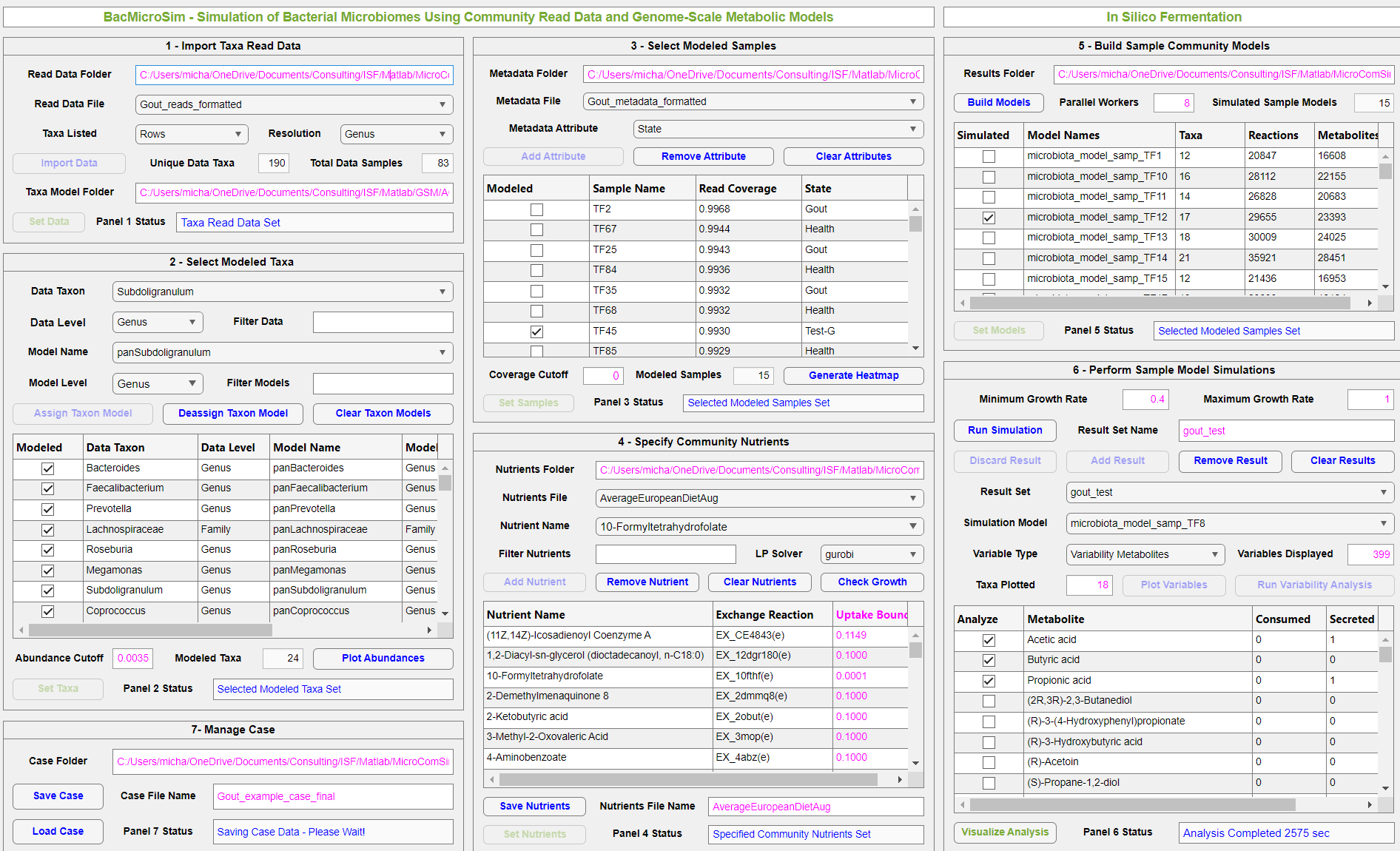
Snapshot of BacMicroSim for predicting differential production of short chain fatty acids in the gut microbiomes of gouty arthritis and healthy patients.
BacMicroSim was released by In Silico Fermentation in September 2025. Please continue reading this page to learn more about the application and to download this free software.
A recent application of genome-scale metabolic reconstructions is the development of community metabolic models of bacterial microbiomes associated with human hosts to better understand various disease states. Stool samples are subjected to 16S rRNA gene sequencing or shotgun metagenomics to produce read data at different taxonomic levels. These read data are normalized to produce the taxonomic abundances of each sample. Computational pipelines such as Microbiome Modelling Toolbox use these taxonomic abundances to develop sample-specific metabolic models that can be simulated to predict the metabolic capabilities of each bacterial community. When combined with metadata describing key attributes of each sample, these in silico predictions can be statistically analyzed to generate hypotheses as to the differential functions of bacterial communities in healthy and diseased patients. While the research literature offers an expanding suite of microbiome modeling tools, these methods invariably require considerable experience with programming languages such as MATLAB.
BacMicroSim is a MATLAB application that enables seamless development, simulation and analysis of bacterial community models derived from taxonomic read data. A fundamental requirement is the availability of genome-scale metabolic models of the relevant taxa. For this purpose, metabolic reconstructions available in the AGORA and AGORA2 resources can be used to develop the necessary taxa models ranging from strains to phyla. The app combines these models with sample abundance data and nutrient uptake constraints to form sample-specific community models that can be subjected to flux balance analysis (FBA) and flux variability analysis (FVA) to predict nutrient uptake, product secretion, and metabolite crossfeeding rates. Community simulations can be performed for different nutrient bounds and stored for visualization and comparison using the included visualization App.
The following PDF file provides an overview of how BacMicroSim can be used to develop and simulate community metabolic models for predicting differential production of short chain fatty acids in the gut microbiomes of gouty arthritis and healthy patients. The predictions are consistent with the hypothesis that production of the anti-inflammatory metabolite butyrate is reduced in the microbiomes of patients suffering from gouty arthritis.
BacMicroSim has the following requirements:
- Version 2021a or newer version of MATLAB along with the Parallel Computing Toolbox.
- Installed COBRA toolbox for MATLAB.
- A linear program (LP) solver compatible with COBRA. A list of compatible LP solvers is available here. The use of either CPLEX or Gurobi is highly recommended.
- Genome-scale metabolic reconstructions compatible with COBRA. The app has been developed for and tested with genome-scale metabolic reconstructions from the the AGORA and AGORA2 resources. Metabolic models at higher taxonomic levels than strain can be generated using the COBRA function createPanModels. These taxa metabolic models must be organized in folders as shown in the downloadable files.
BacMicroSim can be freely downloaded using the link below. The software is distributed under The GNU General Public License v3.0.

The Zip file should be processed as follows:
- Download and unzip the file using Zip archive software.
- The unzipped file will contain the following files and folders: (1) the main application, BacMicroSim_ver_1_0.mlappinstall; (2) the folder AGORA showing the required model folder structure along with instructions for populating the folders with taxonomic metabolic models; (3) the folder Metadata containing an example metadata file for the gout example; (4) the folder Nutrients containing three example nutrient files obtained from the folder cobratoolbox/papers/2018_microbiomeModelingToolbox/input of the installed COBRA toolbox, the nutrient file AverageEuropeanDietAug derived by adding essential nutrients to the nutrient file AverageEuropeanDiet, and the file AgoraMetabolites containing a complete list of AGORA metabolites and their abbreviations; (5) the folder Read_data containing read data files for the gout example and a microbiome study on Clostridioides difficile infections (CDI), MATLAB scripts for converting these two read data files into formatted files required by the app, and the two formatted read files; and (6) the file BacMicroSim_workflow_gout_example showing progression though the app workflow for the gout example.
- Save the files and folders in the desired working directory.
- To install the BacMicroSim application, go to the Apps tab on the main Matlab page and click “Install App”. Select the saved BacMicroSim_ver_1_0.mlappinstall. The BacMicroSim application will appear as a new icon in the Apps tab.
- Initialize the COBRA toolbox using the command initCobraToolbox() and launch the app by clicking on the icon.
Please contact us by email if you have any questions or feedback about BacMicroSim.
