
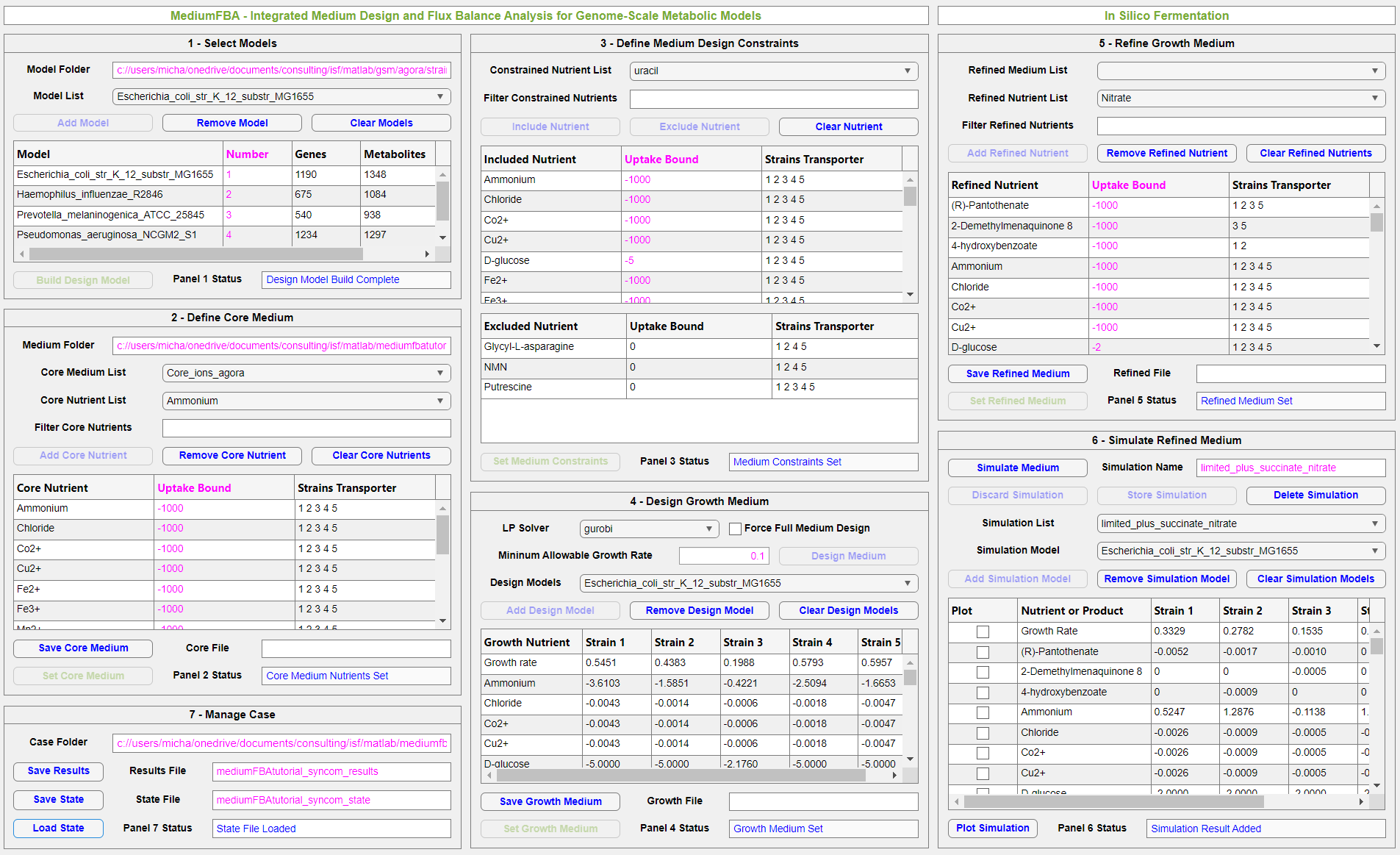
Snapshot of MediumFBA for a five strain bacterial model system with application to cystic fibrosis airway infections.
MediumFBA was originally released by In Silico Fermentation in February 2024 and was most recently updated in November 2025. Please continue reading this page to learn more about the application and to download this free software.
Flux balance analysis (FBA) requires a priori specification of an in silico medium containing all essential nutrients required for growth. Development of in silico growth medium is highly strain dependent and becomes increasingly difficult as additional strains are incorporated. Practitioners often find the medium definition problem for novel microbes and synthetic microbial communities to be a time consuming and frustrating task.
MediumFBA is a MATLAB application that integrates the medium design and FBA problems to allow more efficient analysis of metabolic models. The GUI tool generates growth media that ensure monoculture growth of all included strains, where the metabolic properties of each strain is captured with an available genome-scale reconstruction. The workflow allows the definition of nutrients to be included and excluded from the medium such that the user can guide the medium design algorithm to yield an acceptable solution. The designed medium can be modified by the user to explore the effects of non-essential nutrients and nutrient uptake rates on monoculture growth, nutrient utilization and product secretion patterns.
The following PDF file provides an overview of how MediumFBA can be used to design an in silico medium that yields monoculture growth of five strains comprising a synthetic bacterial community. More specifically, this example considers the design of an aerobic glucose minimal medium for five strains commonly associated with airway infections in cystic fibrosis patients. The genome-scale metabolic reconstructions from the AGORA collection were downloaded from the Virtual Metabolic Human resource.
MediumFBA has the following requirements:
- Version 2021a or newer version of MATLAB.
- Installed COBRA toolbox for MATLAB.
- A linear program (LP) solver compatible with COBRA. A list of compatible LP solvers is available here.
- Genome-scale metabolic reconstructions compatible with COBRA. MediumFBA has been tested with selected reconstructions from the Virtual Metabolic Human resource (i.e., AGORA models), the BIGG repository, and the KBase platform.
MediumFBA version 1.0 was released in February 2024. MediumFBA version 1.1 was released the same month to provide the following improvements over the initial release:
- Improved support for BIGG bacterial reconstructions with a periplasmic compartment.
- Fixes for coding bugs associated with building metabolic models, constructing media and saving/loading App states.
- General improvements in the App workflow.
- Example App files for co-culture models using AGORA and BIGG metabolic reconstructions.
MediumFBA version 2.0 was released in November 2025 to provide the following new capabilities over the previous releases:
- The ability to generate, store and compare multiple FBA result sets simulated with different metabolic models and/or media formulations.
- The ability to plot selected nutrient and product fluxes for any combination of models and any result set.
MediumFBA version 2.0 can be freely downloaded using the link below. The software is distributed under The GNU General Public License v3.0.

MediumFBA is a MATLAB application that integrates the medium design and flux balance analysis (FBA) problems to enable metabolic analyses of microbial strains modeled with genome-scale metabolic reconstructions.
The Zip file should be processed as follows:
- Download and unzip the file using Zip archive software.
- The unzipped file will contain the following files: (1) the main application, MediumFBA_v_2_0.mlappinstall; (2) example core media containing common ions and amino acids for AGORA, BIGG and KBase metabolic models; (3) saved App state and result set for the five strain cystic fibrosis example described above.
- Save the files in the desired working directory.
- To install the MediumFBA application, go to the Apps tab on the main Matlab page and click “Install App”. Select the saved MediumFBA_v_2_0.mlappinstall. The MediumFBA application will appear as a new icon in the Apps tab.
- Launch the application by clicking on the icon.
Please contact us by email if you have any questions or feedback about MediumFBA.
