
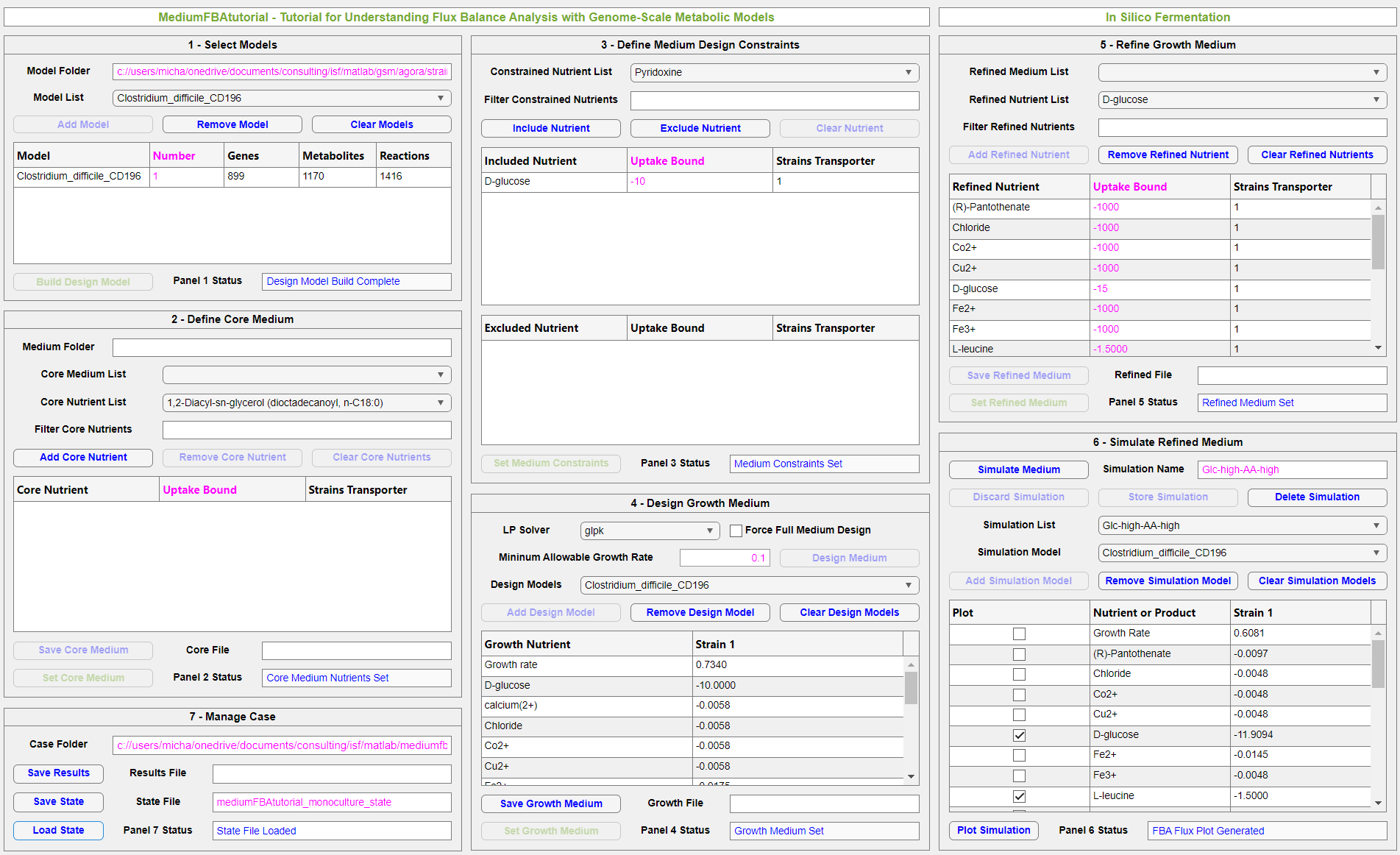
Snapshot of MediumFBAtutorial for a tutorial on the gut pathogen Clostridioides difficile.
MediumFBAtutorial was released by In Silico Fermentation in January 2026. Please continue reading this page to learn more about the application and to download this free software.
Flux balance analysis (FBA) is the most common computational method for interrogating genome-scale metabolic reconstructions. FBA is performed by specifying the maximum uptake rates of medium nutrients and solving a linear program (LP) to calculate the nutrient uptake rates, cellular growth rate, product secretion rates and intracellular reaction fluxes. Despite its widespread adoption in the research community, FBA is rarely covered from a pedagogical setting outside of specialized graduate-level courses. Inexperienced students and industrial practitioners are invariably forced to learn FBA in a piecemeal fashion within coding environments such as MATLAB and Python. As a result, the full power of FBA is often inaccessible to non-experts tasked with rapid problem solving responsibilities.
MediumFBAtutorial is a MATLAB GUI application which builds upon our MediumFBA app to provide a pedagogical introduction to FBA as well as in silico medium design. Users are guided through an intuitive workflow in which they use selected genome-scale metabolic reconstructions to identify nutrients essential for in silico growth, use the developed media to perform FBA, and interpret the results of the FBA calculations. The first tutorial uses a metabolic reconstruction of the gut pathogen Clostridioides difficile to develop a glucose minimal medium containing essential amino acids and vitamins. The developed medium is used to perform FBA for prediction of secreted fermentation and amino acid degradation products. The second tutorial considers the medium design and FBA problems for five bacterial pathogens commonly associated with cystic fibrosis airway infections. A single glucose minimal medium that ensures monoculture growth of each pathogen is designed, and the developed medium is simulated with FBA to predict the growth rate and metabolic products of each pathogen in monoculture.
Each tutorial provides step-by-step instructions within the GUI to provide a totally self-contained training experience. The app state can be captured at any time during the tutorial so that users can reload their work at a later time to continue the example outside the tutorial. Analysis of the FBA simulation results can be open ended to allow users to more fully understand how cellular metabolism and nutrient availability interact to determine cellular growth and product secretion rates.
MediumFBAtutorial has the following requirements:
- Version 2024a or newer version of MATLAB. Older versions of MATLAB may generate unexpected errors.
- Installed COBRA toolbox for MATLAB to provide access to the LP solver GLPK and other functions. Installation instructions are provided here. Other COBRA supported LP solvers can be substituted for GLPK.
MediumFBAtutorial can be freely downloaded using the link below. The software is distributed under The GNU General Public License v3.0.

The Zip file should be processed as follows:
- Download and unzip the file using Zip archive software.
- The unzipped file will contain the following files: (1) the main application, MediumFBAtutorial_ver_1_0; (2) the folder Model containing the six AGORA genome-scale metabolic reconstructions used in the two tutorials; (3) the folder Media containing two loadable core medium files for the AGORA models; (4) the folder Cases containing saved app states for the two completed tutorials, and (5) the folder Results containing saved results sets for the two completed tutorials.
- Save the files in the desired working directory.
- To install the MediumFBAtutorial application, go to the Apps tab on the main Matlab page and click “Install App”. Select the saved file MediumFBAtutorial_ver_1_0. The MediumFBAtutorial app will appear as a new icon in the Apps tab.
- Launch the application by clicking on the icon.
Please contact me by email if you have any questions or feedback about MediumFBAtutorial.
